Skip to content
FlowFunnelflowfunnel.io StartToFlowProFlowDeskFlow
English
Book a demo

Your calendar and your WhatsApp, on the same screen.

Appointment scheduling for medical practices and spas, next to your WhatsApp: drag the patient to a time, send the reminder in one click and mark whether they came.

Part of DeskFlow, for Windows and Mac. It works on the WhatsApp your practice or spa already uses.

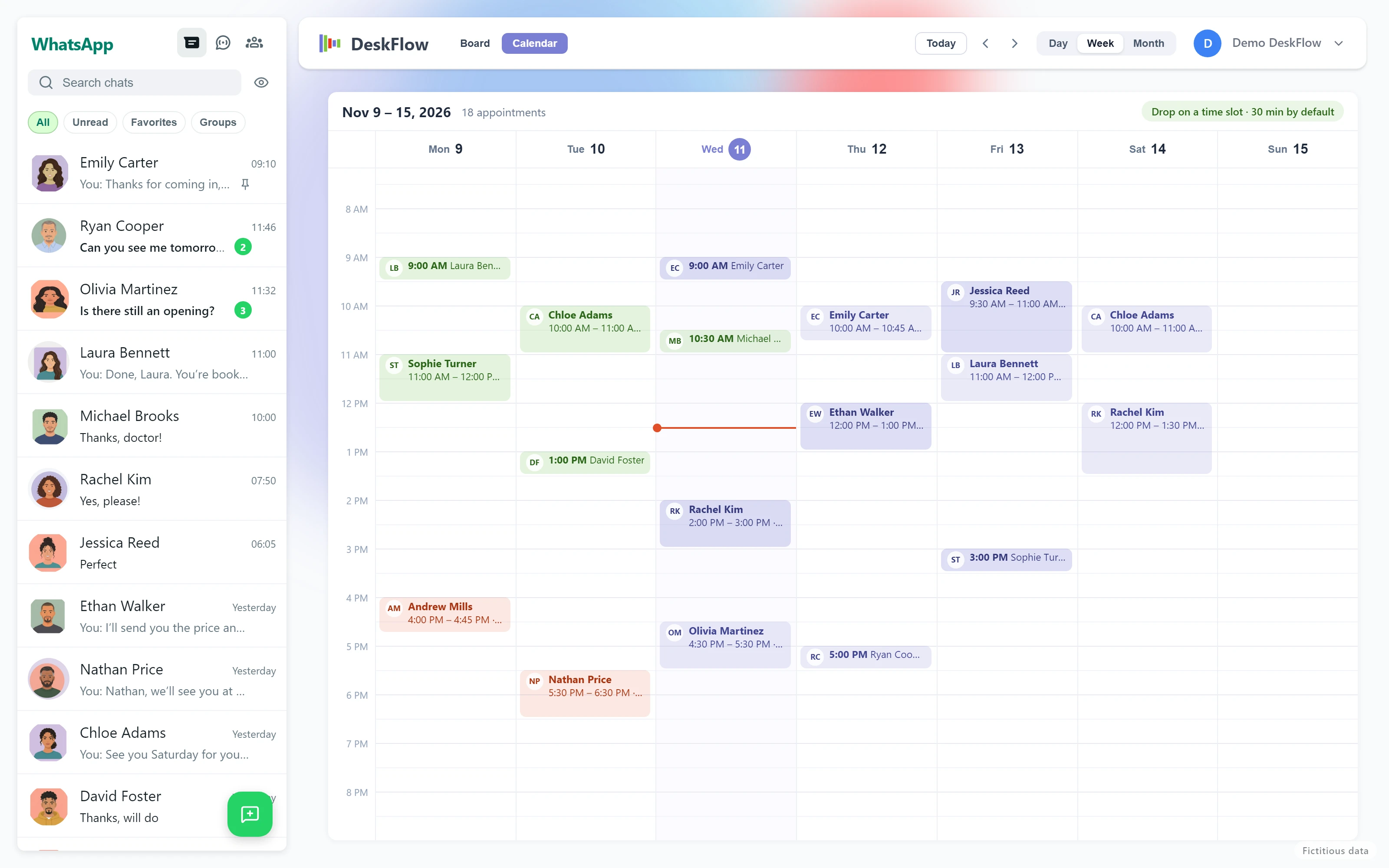
DeskFlow's Agenda in week view, with appointments for a dental practice and spa. Fictitious data.

The problem

The calendar in one place, the patients in another.

Medical practices

Patients who don’t show up

The appointment was booked weeks ago, nobody reminded them, and the slot stays empty.

A notebook, a calendar and a WhatsApp

The front desk books in one place, confirms in another and answers in a third. Something always slips through.

Spas and beauty

Overlapping bookings

Two clients at the same time, because the booking was made from memory between one service and the next.

Clients who confirm late

Or don’t confirm at all, and you find out when they don’t arrive.

How it works

Three steps, from the chat to the chair.

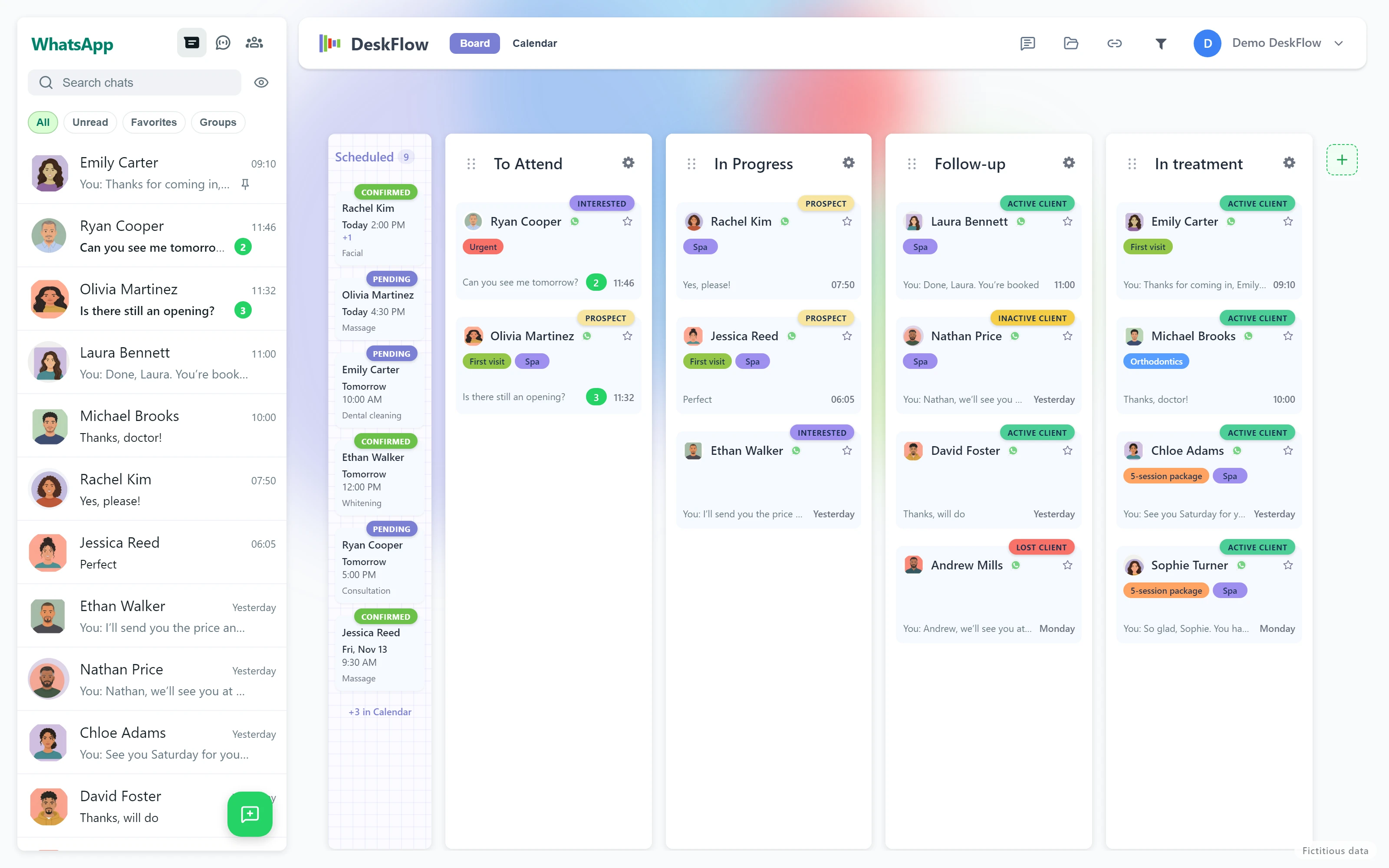
The DeskFlow board with the Booked column: today's and tomorrow's appointments. Fictitious data.
1

Drag the patient to the time

From the board to the calendar: 30 minutes by default. If it takes longer, stretch it.

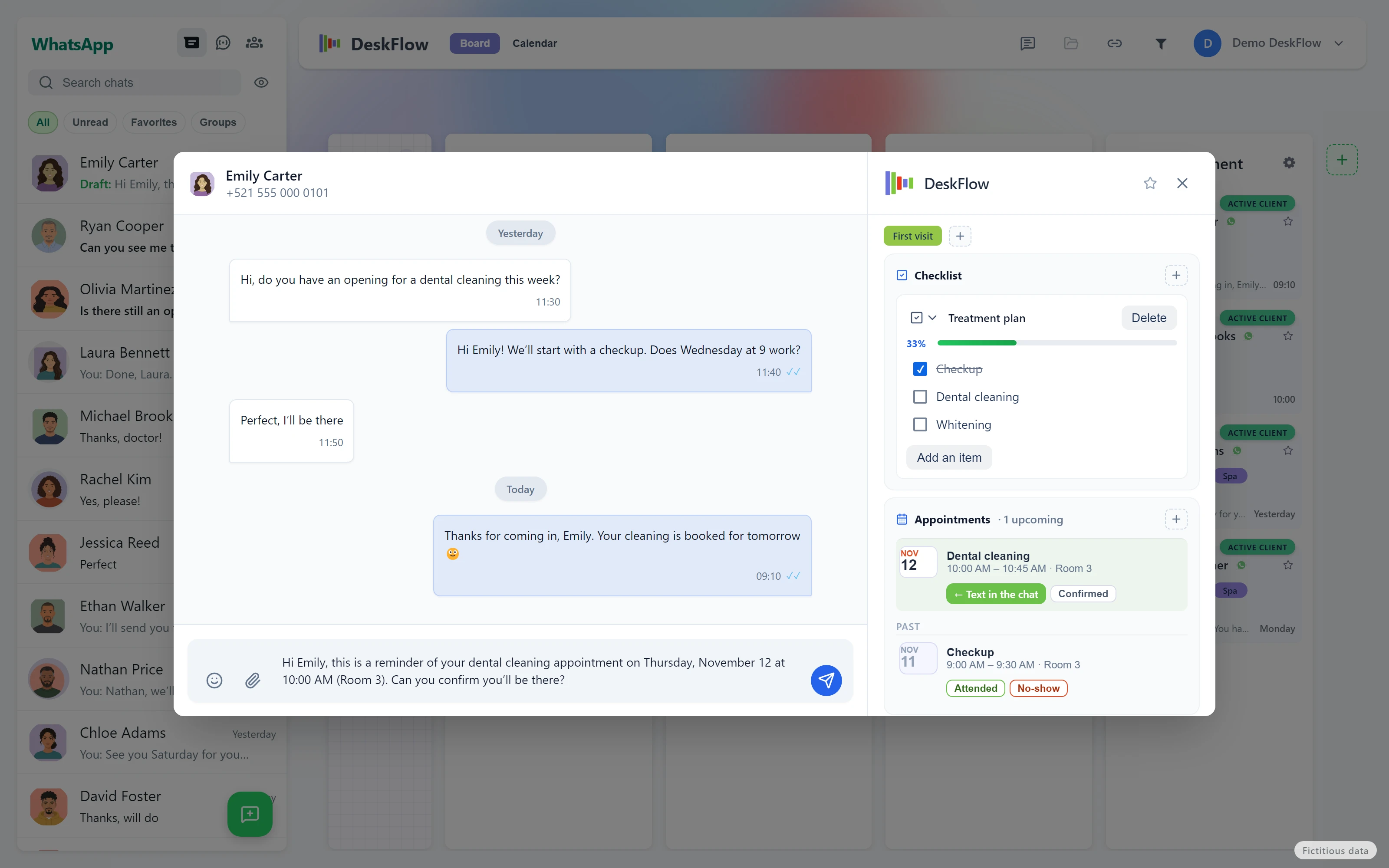
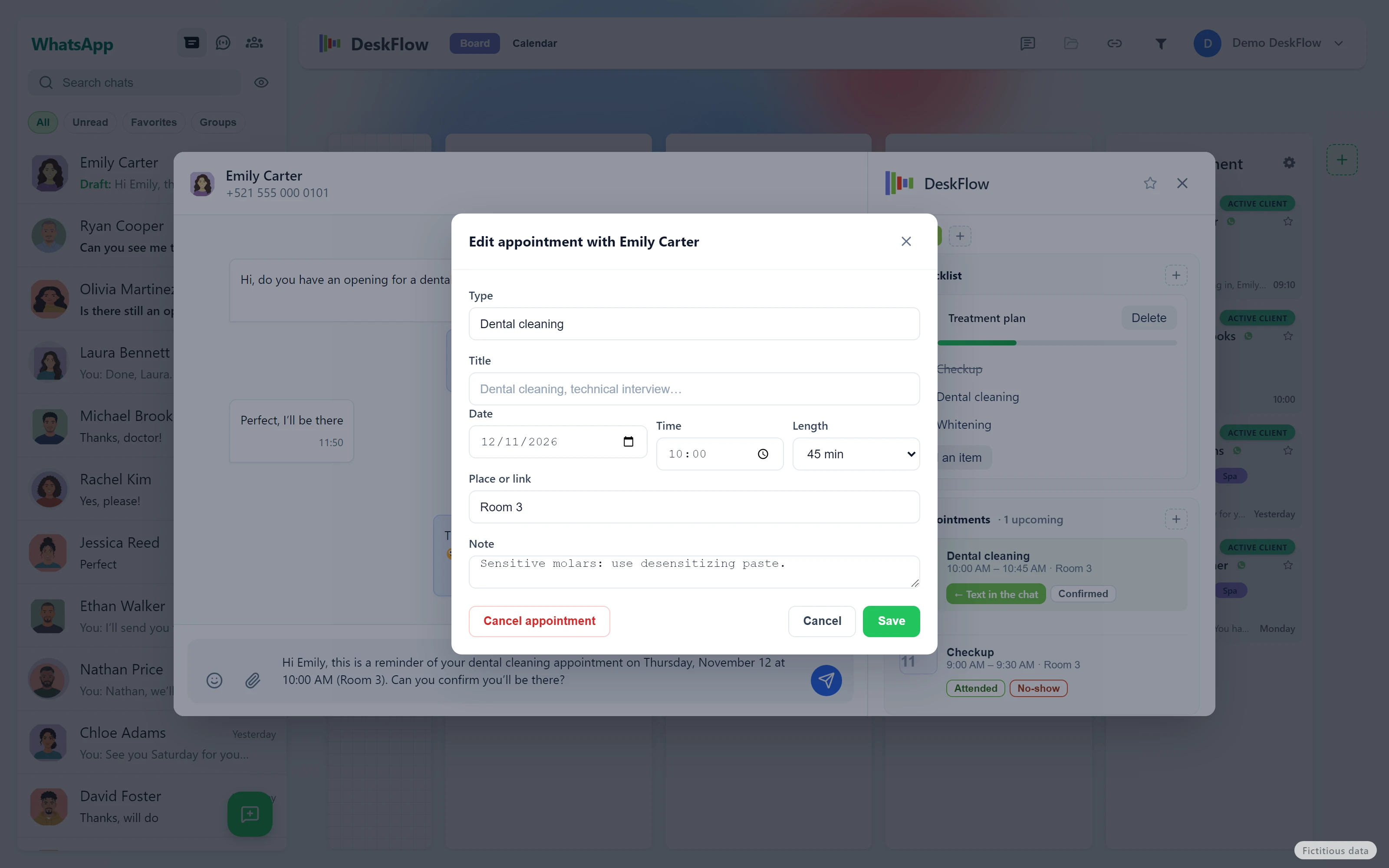
The appointment reminder written in the patient's WhatsApp chat, not yet sent. Fictitious data.
2

Send the reminder in one click

The WhatsApp message is left written in their chat, with the date, time and place. You hit send.

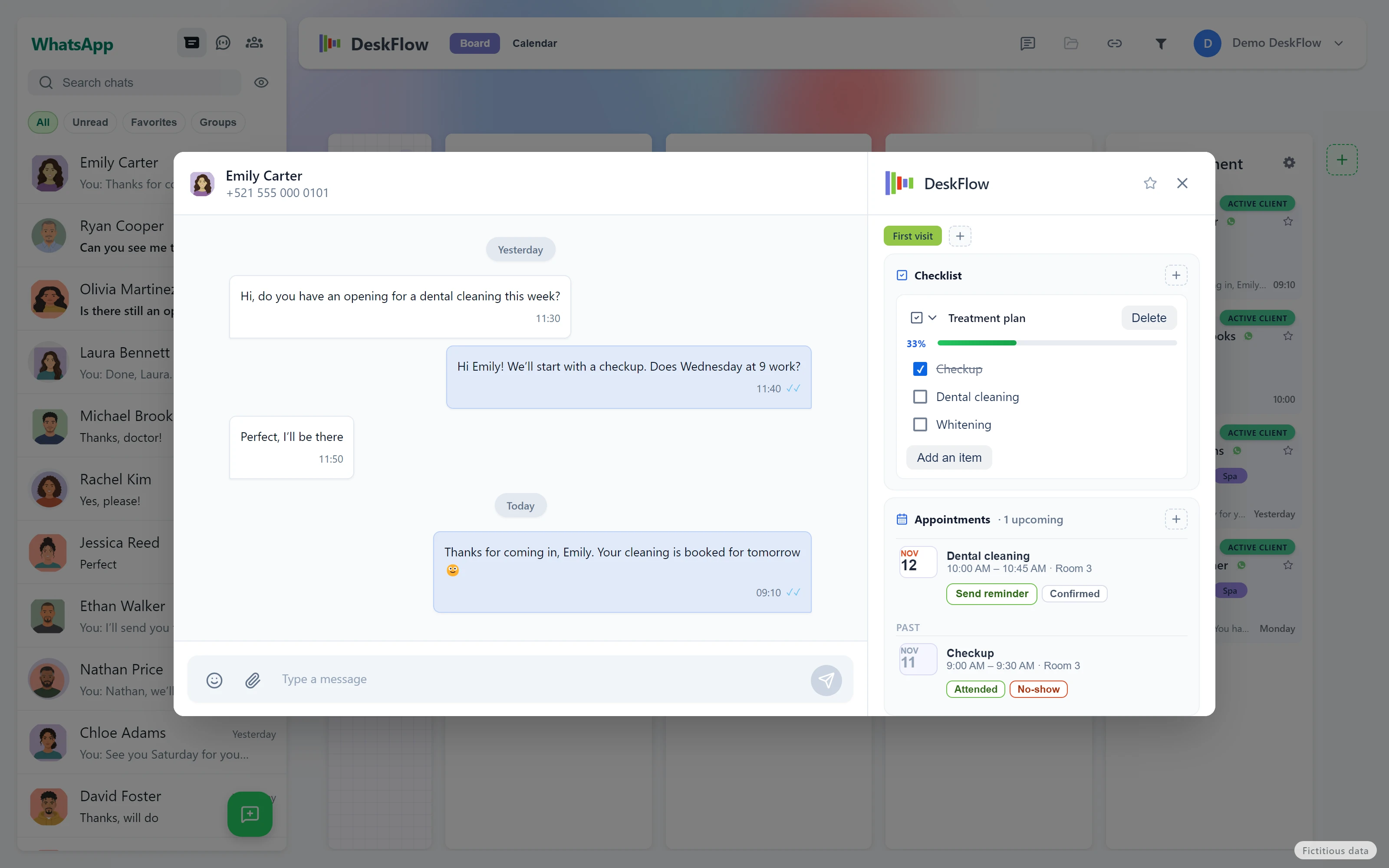
The contact card with the next appointment and the Attended and No-show buttons. Fictitious data.
3

Mark whether they came

Attended or No-show. Over time you see who misses often.

Who it is for

For practices and spas that book on WhatsApp.

Medical and health practices

Dentists, physiotherapy, psychology, nutrition, general medicine.

Appointment types, for example: Consultation · Dental cleaning · First visit · Follow-up · Physio session.

Book a demo

Spas and beauty

Massage, facials, nails, barbershop.

Appointment types, for example: Massage · Facial · Manicure · Haircut and beard.

Book a demo

You name the appointment types; these are examples.

What it does

Everything the Agenda does today.

Board and calendar in one window

One button switches between your contacts board and the calendar. Day, week or month view, with Today, previous and next.

Book by dragging

Drag the patient’s or client’s card to a time: 30 minutes by default. In month view you drop it on the day and pick the hour. To move an appointment, drag it; to change its length, stretch it. If you drop it in the wrong place, there is Undo.

Each appointment with what it needs

Type (Consultation, Dental cleaning, Massage…), title, date, time and length: 30 min, 45 min, 1 h, 1½ h or 2 h. The place or link —office, treatment room, Zoom— and a note.

No accidental double bookings

If that contact already has an appointment at that time, the app warns you before booking a second one: Book anyway or Cancel. When you pick a time, the taken ones are marked.

A “Booked” column on the board

Contacts with an upcoming appointment, the nearest first, marked Today and Tomorrow. You see at a glance who is coming.

WhatsApp reminder in one click

“Send reminder” leaves the message written in the patient’s chat, with that appointment’s details. You send it from your own WhatsApp: it is not a bot and it is not a mass send.

The status of each appointment

Pending, Confirmed, Attended or No-show. Once the appointment has passed, the contact card shows the Attended and No-show buttons, so you see who misses often.

Everything in the contact card

Upcoming and past appointments, next to the chat, the notes and the labels. Canceling an appointment removes it from the calendar and leaves a note in the contact’s activity.

On your computer

The data lives in the desktop app, on Windows or Mac, not in a third-party cloud. It works on the WhatsApp your practice or spa already uses.

In Spanish, English and Portuguese

The reminder goes out in the app’s language.

The demo

What happens in the demo.

  • We show you the Agenda with your kind of practice or spa.
  • If it works for you, we install it together on your computer and connect it to your WhatsApp.
  • It takes 15 minutes, online, on Google Meet.

Book a demo.

Pick a time. I’ll confirm on WhatsApp and send you the Google Meet link.

Day

Time · Mexico City

By booking, you agree that we contact you on WhatsApp and by email about this demo. See the Privacy Policy.

This page needs JavaScript to show the free times.

Prefer to write now? Message me on WhatsApp

What practices and spas ask first

Does the reminder send itself?
No. It is left written in the patient’s chat and you send it, from your own WhatsApp. It is not a bot, it is not scheduled and it does not send in bulk.
Where does my data stay?
On your computer, in the DeskFlow app. Not in a third-party cloud.
Where do I download it?
In the demo we help you install it on your computer and connect it to your WhatsApp.
Can patients book on their own with a link?
Not today. You book the appointment from the app, dragging the contact to the time.
Does it sync with Google Calendar or Outlook?
Not today. The appointments live in DeskFlow.
Can several people at the front desk share the same agenda?
Not today: it is one WhatsApp number on one computer, with its own agenda.
Is it a clinical record system?
No. It is a calendar and a CRM for your WhatsApp, not medical software: it does not keep clinical records.
Does it take payments or deposits?
No. It does not charge or ask for deposits.
Which computer does it run on?
Windows, and Mac with Apple chip (M1 or later, macOS 12 or later).